
Soccer Scorebug — Classic
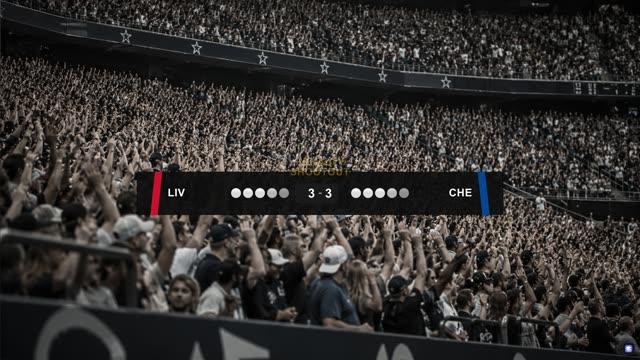
Soccer scorebug with team scores, match clock, and an operator-triggered stoppage-time readout.
A soccer scorebug is the on-screen graphic overlay — usually positioned top-left or top-center — that displays the live match score, team names or crests, and match clock throughout a broadcast or stream. It stays visible for the duration of the game, giving viewers a constant read on the score without cutting away from the action.
- •Team names, crests, or abbreviations
- •Live score
- •Match clock / stoppage time
- •Period or half indicator
- •Optional: card trackers, possession stats, organizer branding
- 01Choose a scorebug templateStart from a pre-built layout instead of designing from scratch.
- 02Customize team info and brandingSwap in team names, crests, and colors to match the fixture.
- 03Connect live data (optional)Link the scorebug to a live data feed so score and clock update automatically, or update the score manually in real time through an operator control panel.
- 04Add animationApply intro/outro motion so the bug animates on and off screen instead of just cutting in.
- 05Publish to your playout or streaming softwareCloudMonet gives you an output URL for the scorebug. Add it as a Browser Source in OBS or vMix, then position it on your live output.
- 06Run the showUse the operator control panel to update the graphic live as the match progresses: scores, red cards, goals, and other in-game events.
Two plates, clock pill below teams
Teams content and Match content sit on two separate background surfaces — a wide plate for names/scores, a narrower rounded pill below it for period/clock/stoppage — rather than one continuous bar. This keeps the score readable as the primary information and the clock module readable as a secondary instrument, not 'another score.'
Parallelogram color accents, not a tinted chassis
Home and away colors live on parallelogram accents at the plate edges, not on the plate fill itself. The chassis stays a predictable near-black at 93% opacity regardless of team colors, so contrast against any pitch backdrop is reliable. The accents do the identity work.
Match clock is operator-driven, not feed-bound
The match clock widget runs in countup mode with a total-minutes format (67'). The operator sets kickoff time and starts/pauses/resumes the widget directly, rather than binding it to a live feed — soccer clocks pause and resume in ways a feed-driven clock can't represent cleanly.
Stoppage time is an operator-triggered overlay, not a scheduled field
The stoppage-time readout is hidden by default and toggled on by the operator independently of the graphic's own entrance and exit animation — typically once the fourth official's board goes up. It joins the clock pill's existing reveal beat when switched on, rather than animating in on its own schedule.
IN plays once, then holds
The entrance animation runs once and the graphic holds on its final frame indefinitely — there's no separate timer counting down a 'hold' duration. The graphic stays exactly as it last rendered until the operator triggers OUT.


Ready to use this template?
Open it in the CloudMonet editor to customize and export.